Student Financial Responsibility
For every semester you want to register for classes at OCCC, you will need to read and sign the Student Financial Responsibility Form.
Step 1
- Go to occc.edu
- Login into MyOCCC Portal
- Sign in using your OCCC username and password, forgot password or account locked? Click here to learn how to reset it.

Your name will be displayed in the top right-hand corner of the screen.
Step 2
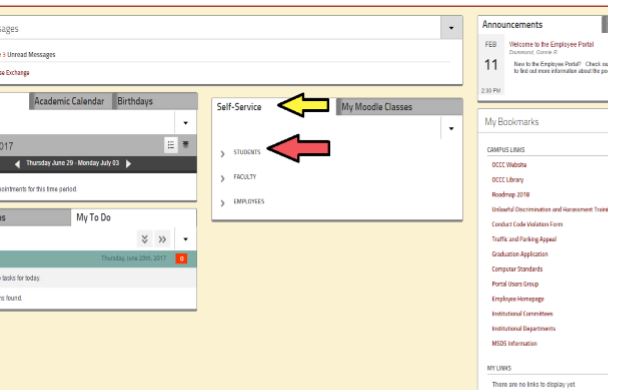
- Click on where is says "Self-Service" that is in the middle of the page.
- Then Click on "Students" tab.
Step 3
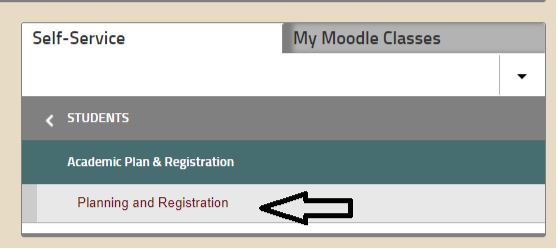
- Click on "Academic Planning and Registration"
- Then "Planning and registration"
You then will get redirected to main page of the student planning software.
Step 4
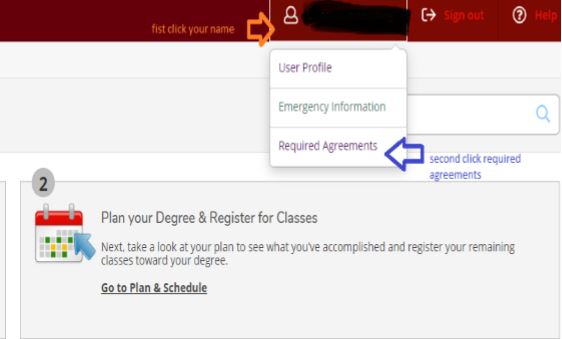
- Click on your name/person icon (top right of the page)
- In the drop-down pick required agreements
Step 5
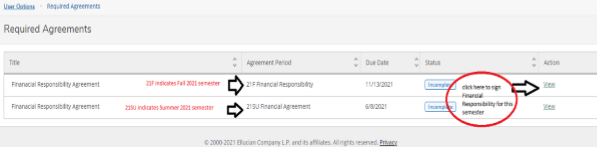
- Click view to review the forms
- Read through the form
Step 6
- Click Accept
- Repeat for all semesters you are registering for
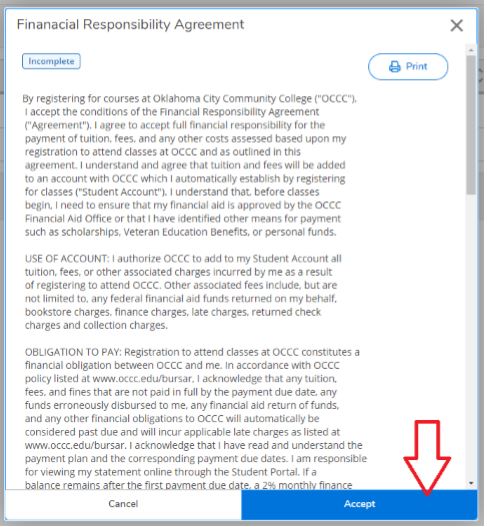
Step 7
- Once submitted click on the white house icon on the left side of the page
- Click on student planning (middle of the list on the right side of your screen)
You then will get redirected you back to the main screen of the student planning software.
- Oklahoma Rising Scholars Program
- Bobby G. Gaines High School Equivalency Waiver Program
- Career Development Tuition Waiver Program
- Student Scholarships
- Freshman Tuition Waiver
- International Student Tuition Waiver
- Out-of-State Transfer Tuition Waiver
- OKCGo Program
- Reach Higher
- Scholars for Excellence in Child Care
- Inspired to Teach
- Degree Completion Tuition Waiver
Questions? Contact Us.
Office of the Bursar
Email Us
(405) 682-7825